
Car Editor & Al Car Designer
Leading Software Development StudioAuto & Vehicles
4.147.00 Reviews
- Version
- 1.1.5
- Installs
- 10.00K
- Age Rating
- Everyone
Screenshots

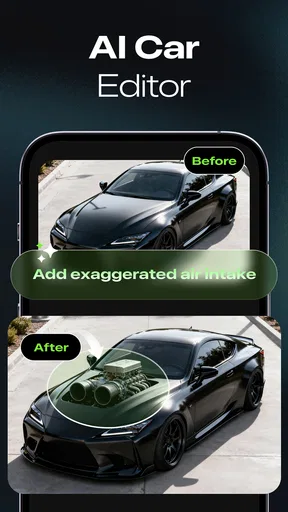
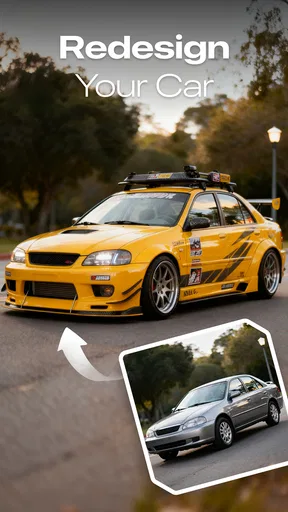
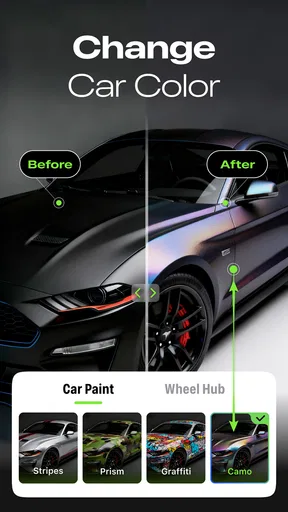
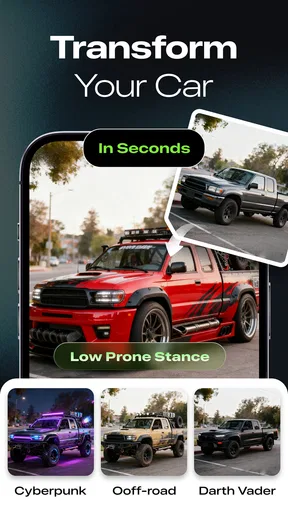
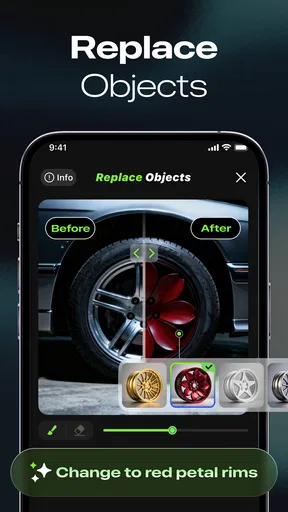
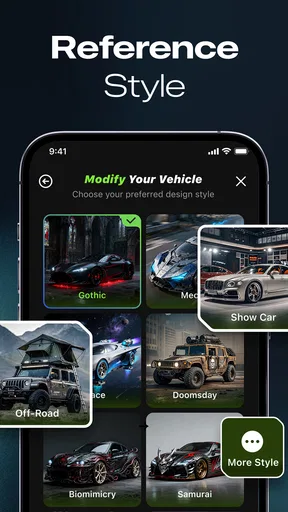
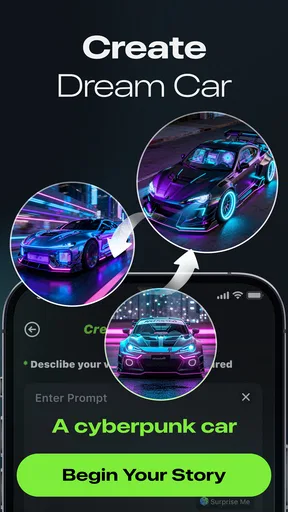
Our Review of Car Editor & Al Car Designer
 Analysis by Appyee
I like starting a car-design session with one clear idea rather than trying to change everything at once. With Car Editor & Al Car Designer, that means choosing a direction—perhaps a more athletic look or a futuristic one—and judging each result against it. An AI-generated redesign is most useful as a visual prompt, not a finished answer: I look for what feels right, then decide what I would change. That simple habit keeps experimentation focused and makes it easier to compare different looks.
A practical baseline for each redesign
My most useful workflow is to begin with a recognizable starting point, make one kind of change, and pause to inspect the overall shape before moving on. If I shift the body style and color at the same time, it becomes harder to tell which choice improved the result. Working in small passes gives me a clearer sense of what the AI has changed and whether the new direction still suits the car.
I also treat each attempt as a concept rather than a blueprint. A dramatic render can help me explore a mood, but it should not be mistaken for engineering guidance or proof that a design could be built. That distinction matters if you are using the app to think about real automotive design: it can encourage visual exploration, while practical decisions still call for specialist tools and knowledge.
Settings and choices worth checking
Before spending time on a detailed redesign, I check which options are available in the version I am using and whether a particular tool is part of a paid offering. The app is free to download, while in-app purchases range from $4.99 to $39.99 per item, so it is sensible to explore the basic experience before buying anything. I would make a purchase only when I know it solves a specific creative need, not simply because an option looks tempting.
The app is developed by Leading Software Development Studio. Its 1.1.5 version requires Android 7.0 or later, and it is rated for Everyone. On Google Play it has a 4.1 average from around a thousand ratings, with over 10,000 installs. Those figures offer a little context, but they do not tell me whether its particular design approach will suit you; the best test is whether you enjoy steering a concept through several visual iterations.
Unleashing Your Inner Designer
Once you fire up the app, you're greeted with a sleek interface that's both inviting and intuitive. It doesn’t matter if you're a car enthusiast or someone just looking to kill time, this app caters to all. The tools provided allow you to modify almost every aspect of a car’s design, from the bodywork to the tiniest details like the rims or mirrors.
The real magic happens when you start playing with the 3D modeling features. It's not just about changing colors or adding decals; you can actually reshape the car's body. The app's user-friendly controls make it surprisingly easy to manipulate the 3D model, allowing even novices to create something unique. Imagine dragging and stretching parts of the car with just a swipe of your finger. It’s like digital clay molding!
AI-Powered Features
What sets Car Editor & Al Car Designer apart from other design apps is its use of artificial intelligence. The AI can suggest improvements or alternative designs based on your initial inputs. At first, I was skeptical, but after a few tries, I found the suggestions surprisingly helpful and often better than my original ideas!
Another standout feature is the AI’s ability to adapt the designs to real-world car manufacturing constraints. It won't let you create something that's impossible to build, which adds a layer of realism to your creations. This is particularly cool if you’re serious about car design and want to understand the practicalities involved.
Customization Galore
If you're a fan of customization, this app is a gold mine. You can choose from a wide array of pre-existing car templates or start from scratch. The color palettes are extensive, and the materials library is impressive, offering everything from matte finishes to glossy metallics.
But it doesn't stop there. The app also lets you add accessories to your car. Want a spoiler, a sunroof, or some flashy neon underglow? You got it. Each addition can be modified to your heart’s content, allowing for endless creativity.
Sharing and Community
Once you're done crafting your masterpiece, sharing it with the world is a breeze. The app integrates smoothly with social media platforms, letting you post your designs directly. There's also a vibrant community within the app where you can showcase your work, get feedback, and even collaborate with other users.
One cool feature is the ability to download other users' designs for inspiration or further modification. It’s a dynamic and engaging space that keeps you coming back for more.
When this style of car app fits
For an everyday example, I might have a few minutes while waiting for a friend and want to see whether a familiar-looking car would work better with a bold, futuristic treatment. I can use that short session to explore a direction, then return later to refine the details. That is a better fit for this app than trying to produce a polished, technically precise vehicle plan in one sitting.
It should appeal most to people who enjoy visual customization, want a low-pressure way to explore car concepts, or need inspiration before sketching by hand. If you mainly want to edit a photograph of your actual car, a conventional photo editor is likely the more direct choice. If you need accurate CAD geometry for fabrication or professional engineering, a dedicated design tool is a better match. Car Editor’s appeal is the fast jump from an idea to an imaginative redesign.
Repeatable habits make experiments clearer
A useful shortcut is to keep a mental baseline: remember the original look, choose one design goal, and assess each variation against both. I also avoid treating every AI suggestion as an instruction. If a suggestion changes the character of the car in a way I did not want, I can use it as a prompt for a smaller adjustment instead of accepting the whole direction. That makes the AI a creative partner rather than the driver of the session.
When I am comparing concepts, I would capture or save the versions I care about before continuing, wherever the app’s available options allow it. That prevents a promising early idea from getting lost in a run of experiments. It is especially helpful when comparing subtle choices such as a restrained finish against a more attention-grabbing one: looking back at the alternatives makes the trade-off easier to judge than relying on memory.
Limits to keep in mind
AI-led redesign is naturally less predictable than making every change by hand. A result may be visually striking without matching the exact proportions or details you had in mind, so I would not choose this app when precise control is the main requirement. Likewise, claims about manufacturing realism should be treated as part of the creative experience, not as a substitute for automotive engineering review.
There is also a practical difference between trying an app for free and accessing every option you might want: paid items can add up, and the listed purchase range is broad. I recommend beginning with the free experience and deciding whether you have a repeated use for a paid tool before spending. People who want a one-off photo touch-up, exact technical drawings, or a completely predictable editing workflow may be happier with another kind of app.
Is It Worth It?
After spending some quality time with Car Editor & Al Car Designer, I can confidently say it's worth a download. Whether you're looking to pass the time, explore a potential career in automotive design, or just want to have some fun, this app delivers on all fronts.
While there are in-app purchases for advanced features, the free version is more than enough to get started and create some amazing designs. It’s a nifty tool that combines creativity, technology, and a touch of realism, making it a must-try for anyone with a passion for cars.
My recommendation comes with a clear boundary: enjoy it as a playful concept studio, and use its AI to widen your options rather than settle important design decisions for you. If that is what you want, I think it is a rewarding place to test ideas and discover styles you might not have sketched on your own. If you need exact photo editing or professional-grade vehicle modeling, choose a tool built for that job instead.
Verdict
Strengths of Car Editor & Al Car Designer
- Intuitive interface for easy design.
- Wide range of customization options.
- High-quality 3D graphics.
- Regular updates with new features.
- Smooth performance on most devices.
Limitations of Car Editor & Al Car Designer
- Limited free content without purchase.
- In-app ads can be intrusive.
- Complex features for beginners.
- Requires stable internet connection.
- Large file size may need more storage.
Other Releases by Leading Software Development Studio
View All
Ai Tattoo ldeas-Art Generator
Art & Design4.5
Similar Picks in This Category
View All
Android Auto
Google LLC4.1

maxim — order a taxi & food
PT. SITO4.7

Штрафы ГИБДД: проверка с фото
Pays LLC – Штрафы ГИБДД4.7

Номерограм – проверка авто
Авто Ассист4.8

Дром Авто
Дром4.9

Frequently Asked Questions
What is Car Editor & Al Car Designer?
Car Editor & Al Car Designer is a mobile application that allows users to customize and modify car designs using intuitive tools and features. It offers a wide range of customization options, including color changes, body modifications, and accessory additions, making it perfect for car enthusiasts and those interested in automotive design.
Is Car Editor & Al Car Designer free to use?
The app offers a free version with basic features, allowing users to explore and test its capabilities. However, for advanced features and a more comprehensive design experience, users may need to purchase in-app items or subscribe to a premium version. This ensures access to the full array of tools and customization options.
Which devices are compatible with Car Editor & Al Car Designer?
Car Editor & Al Car Designer is available for both Android and iOS platforms. It requires a device running at least Android 8.0 or iOS 11.0. Ensure your device has sufficient storage space and processing power for optimal performance, especially when using advanced design features.
How user-friendly is Car Editor & Al Car Designer for beginners?
The app is designed with both beginners and experienced users in mind. It features an intuitive interface with easy-to-follow tutorials and guides. Beginners can quickly learn to navigate the app and use its basic features, while experienced designers can dive into more complex customizations.
Does Car Editor & Al Car Designer offer real-time sharing options?
Yes, the app allows users to share their car designs in real-time. It includes built-in options to export designs via social media platforms, email, or messaging apps. This feature encourages community interaction and feedback, enabling users to showcase their creativity and receive suggestions.
